Melidoc
Finance documents, checked before they reach your ledger

Automate document processing and transform unstructured files into structured business data.

Core ProductDocument Intelligence

14-day free trial · No setup fee · Pay by QRIS or virtual account

What is Melidoc?

Melidoc is document AI from Almeli Labs for finance teams in Indonesia. It reads invoices, purchase orders, tax invoices (faktur pajak) and ID cards (KTP), turns them into structured fields, and checks PPN, PPh, totals and duplicates before the data reaches your ERP or accounting system.

Free trial
14 days, no payment
Starting price
Rp 149.000 / month, excl. PPN
Plans
Starter, Growth, Business, Enterprise
Billing
Monthly or yearly (2 months free)

Inside Melidoc
the screens your team works in

Screenshots from the app, filled with sample data.

The document and its checks, side by side

The original page stays on the left, the checks on the right. Approve, reject or read the file again from the same screen.

  • DPP, PPN, totals, line items and NPWP format checked
  • Review, approved and failed tabs for the whole queue
  • PDF, scans and phone photos in one list
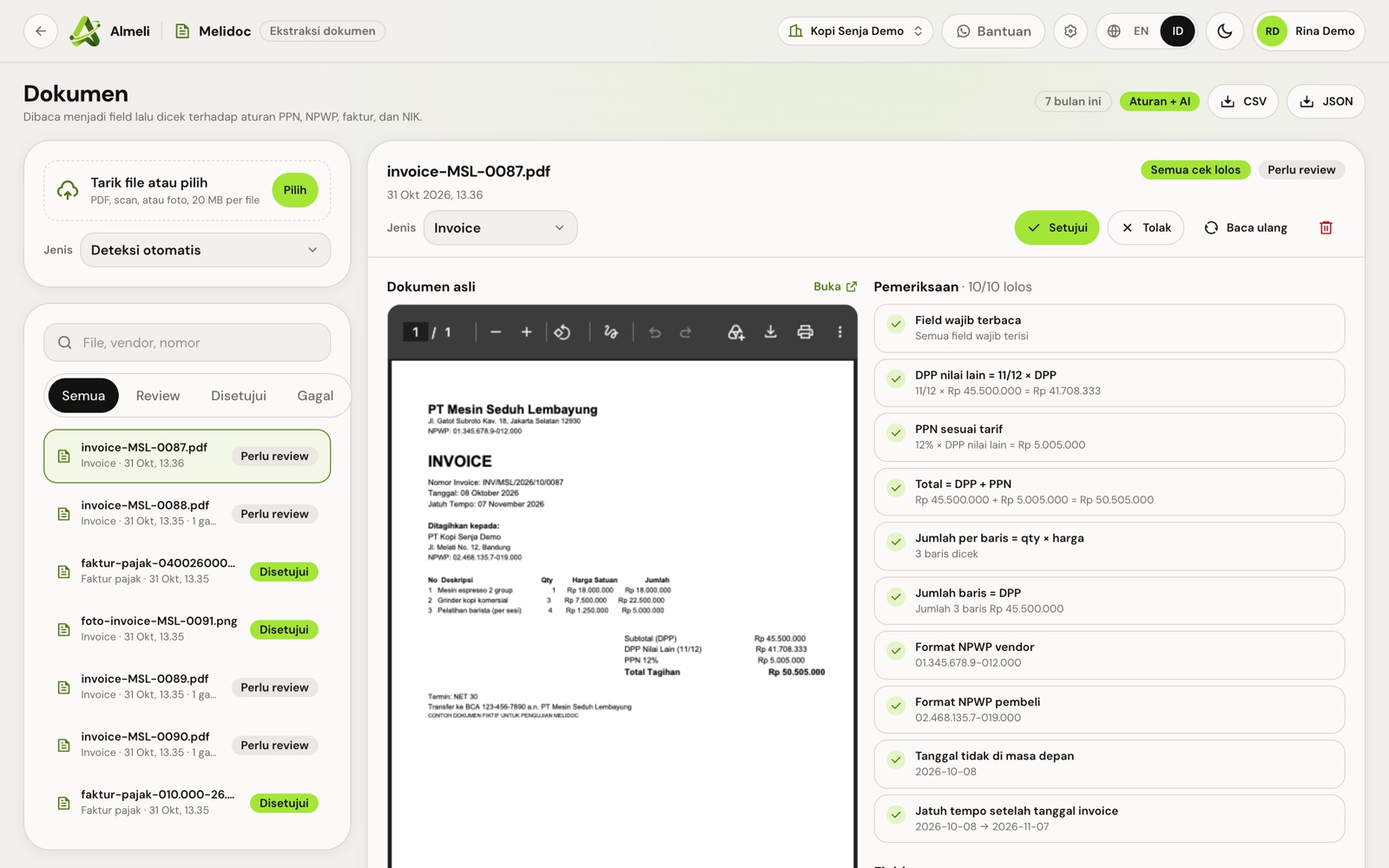
Melidoc review screen: an invoice PDF beside a list of ten checks that all passed

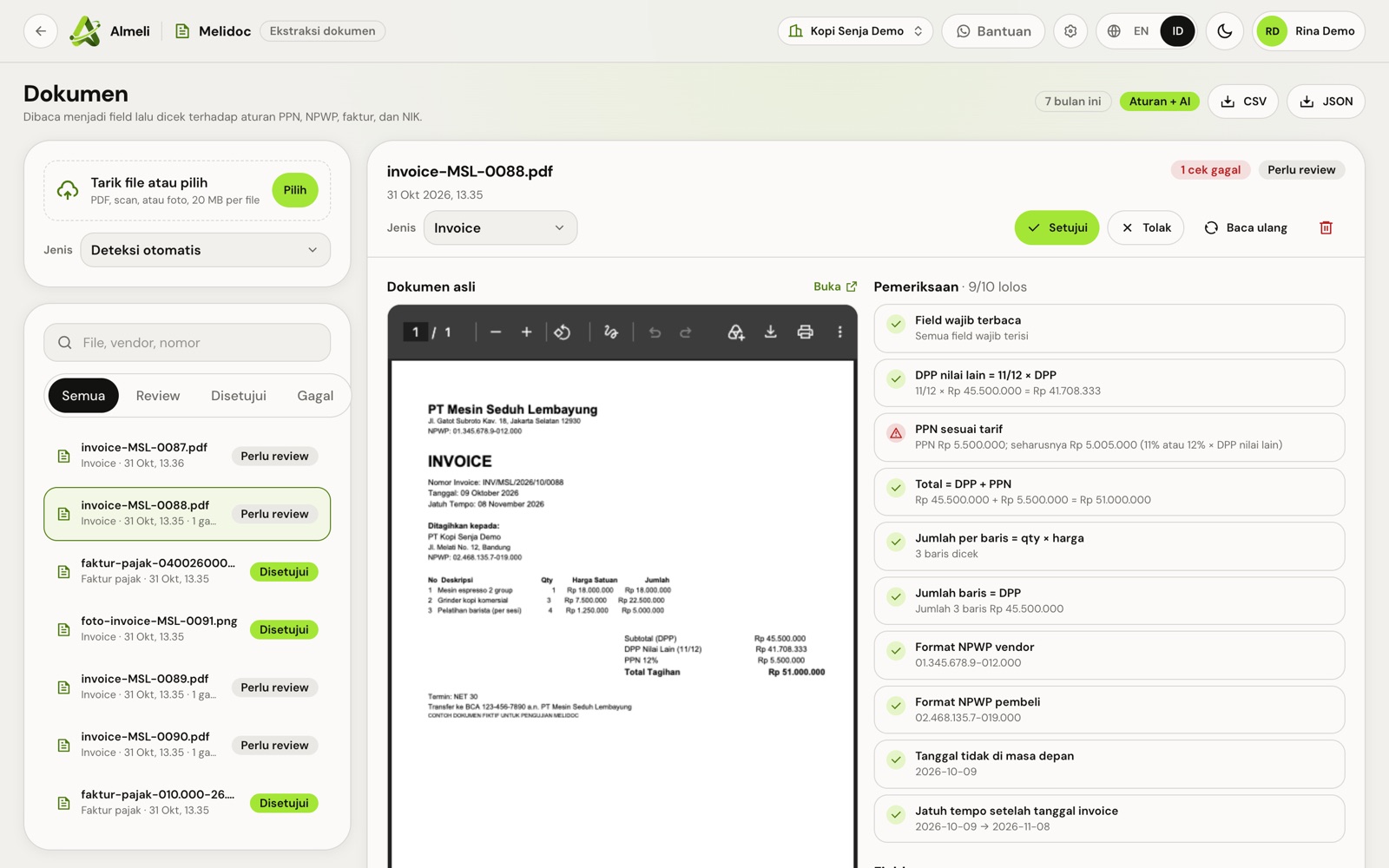
A wrong PPN is caught before posting

When a figure does not add up, the check says what it found and what it should be, so finance can reply to the vendor right away.

  • PPN recalculated at 11% or 12% of the other tax base
  • Totals and line sums recalculated
  • Dates and due dates checked for sense
Melidoc flags an invoice whose PPN does not match the rate, with the correct amount shown

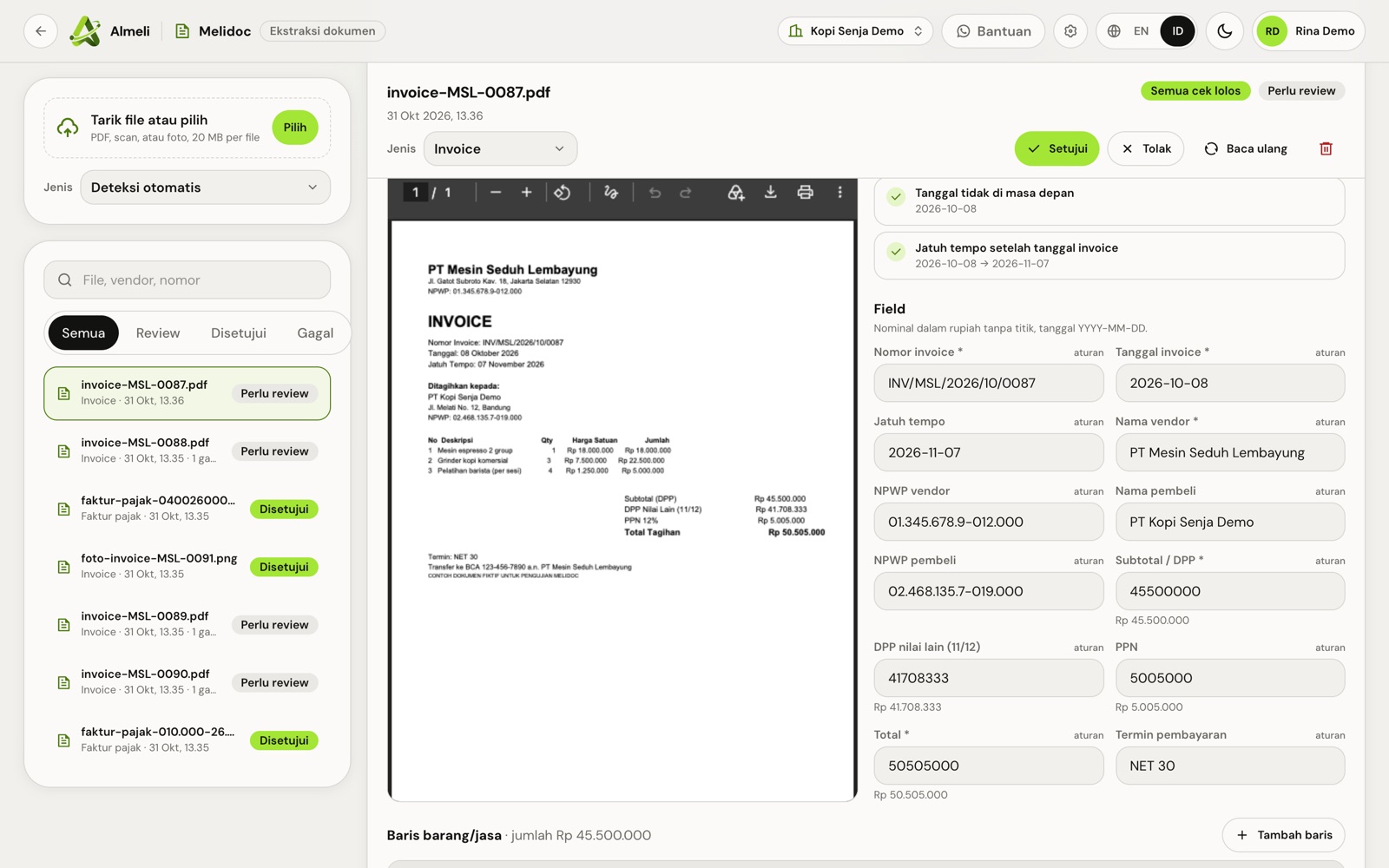
Typed fields, ready for your books

Invoice number, dates, vendor, buyer, NPWP and every amount come out as data you can export or send on.

  • Export to CSV or JSON
  • Each field shown next to the original page
  • Approved data sent to your ERP by webhook or API (Growth and up)
Fields read from an invoice: number, dates, vendor, buyer, NPWP, DPP, PPN and total

How Melidoc works
in four steps

  1. Send the document

    Upload a PDF or photo, forward it to your Melidoc inbox, or drop it in a Google Drive folder.

  2. Melidoc reads it

    Vendor, numbers, dates, line items and tax fields come out as data. Each file is read up to 10 pages.

  3. The math is checked

    PPN, PPh and totals are recalculated, and a document you already received is flagged.

  4. Approve and send

    Your team approves, then the data goes to your ERP by webhook or API, with an audit trail.

What you get with Melidoc
built for teams in Indonesia

  • Invoices, POs, faktur, KTP

    The documents finance teams handle every day, including scans and phone photos.

  • Tax and total checks

    PPN, PPh and grand totals are recalculated so a wrong figure is caught before posting.

  • Duplicate detection

    The same invoice sent twice is flagged, so it is not paid twice.

  • Inbox and Drive intake

    Documents arrive the way vendors already send them. No new habit for anyone.

  • Webhook and API to ERP

    Approved data goes straight to your ERP or accounting system (Growth and up).

  • Review and audit trail

    Every field can be checked against the original page, and every approval is recorded.

Melidoc plans
and what each includes

Prices exclude PPN 12%, added at checkout. Each period is billed on its own invoice; nothing is charged automatically.

Starter

Untuk tim keuangan kecil.

Rp 149.000per month, excl. PPN

or Rp 1.490.000 a year, 2 months free

Try 14 days free
  • 500 dokumen per bulan
  • 3 akun tim
  • Invoice, PO, faktur pajak, KTP
  • Cek PPN, PPh, total, dan dokumen ganda
  • Ambil dari inbox dan Drive

Business

Untuk volume tinggi yang tersambung ke ERP.

Rp 549.000per month, excl. PPN

or Rp 5.490.000 a year, 2 months free

Try 14 days free
  • 6.000 dokumen per bulan
  • 20 akun tim
  • Semua fitur Growth

Enterprise

Untuk grup dengan banyak entitas.

  • Volume sesuai kontrak
  • Aturan validasi khusus
  • Engineer khusus
  • SLA

fromRp 1.990.000per month, by contract

Contact sales

How to order Melidoc
from sign-up to your first day

  1. Create your Almeli account

    Sign up with your work email and open the verification link we send. The same account opens every Almeli product.

  2. Choose a plan

    In the console checkout, pick a plan and monthly or yearly billing. A voucher or referral code goes here too.

  3. Start free or pay

    Start a 14-day trial with no payment, once per organization. After that, pay the invoice by QRIS or virtual account.

  4. Open Melidoc and invite your team

    Open it from the console, add team accounts by email, then follow the setup steps above.

Who uses Melidoc
and what changes

Tax forms, receipts and a calculator on a desk

Accounts payable

Vendor invoices and faktur pajak are read, checked and ready to post, instead of typed in one by one.

A person signing a printed document

Procurement and onboarding

Purchase orders and vendor KTP become data your team can search and match.

Works with

  • PDF
  • JPG / PNG
  • Email inbox
  • Google Drive
  • REST API
  • Webhook

Melidoc questions
answered

Which documents does Melidoc read?

Invoices, purchase orders, Indonesian tax invoices (faktur pajak) and ID cards (KTP), as PDF or photos. Each file is read up to 10 pages.

Does it check Indonesian tax?

Yes. It recalculates PPN, PPh and totals on each document and flags figures that do not add up.

Can it send data to our ERP?

Yes, from the Growth plan: approved documents are sent by webhook or REST API.

How long are documents kept?

90 days on Starter, 180 days on Growth and 365 days on Business. Enterprise follows your contract.

Can we try it first?

Every paid plan starts with a 14-day free trial on your own documents.

Start using Melidoc
Finance documents, checked before they reach your ledger

14-day free trialNo setup feePay by QRIS or virtual account